Edge AI Lab: On-Device Gemma from Zero to Three Engines
Building a research-grade macOS and iOS app for on-device Gemma 4 inference — three backends (LiteRT-LM, MLX, llama.cpp), a custom eval framework, tool calling, and a design system that refuses to look like every other local AI app.
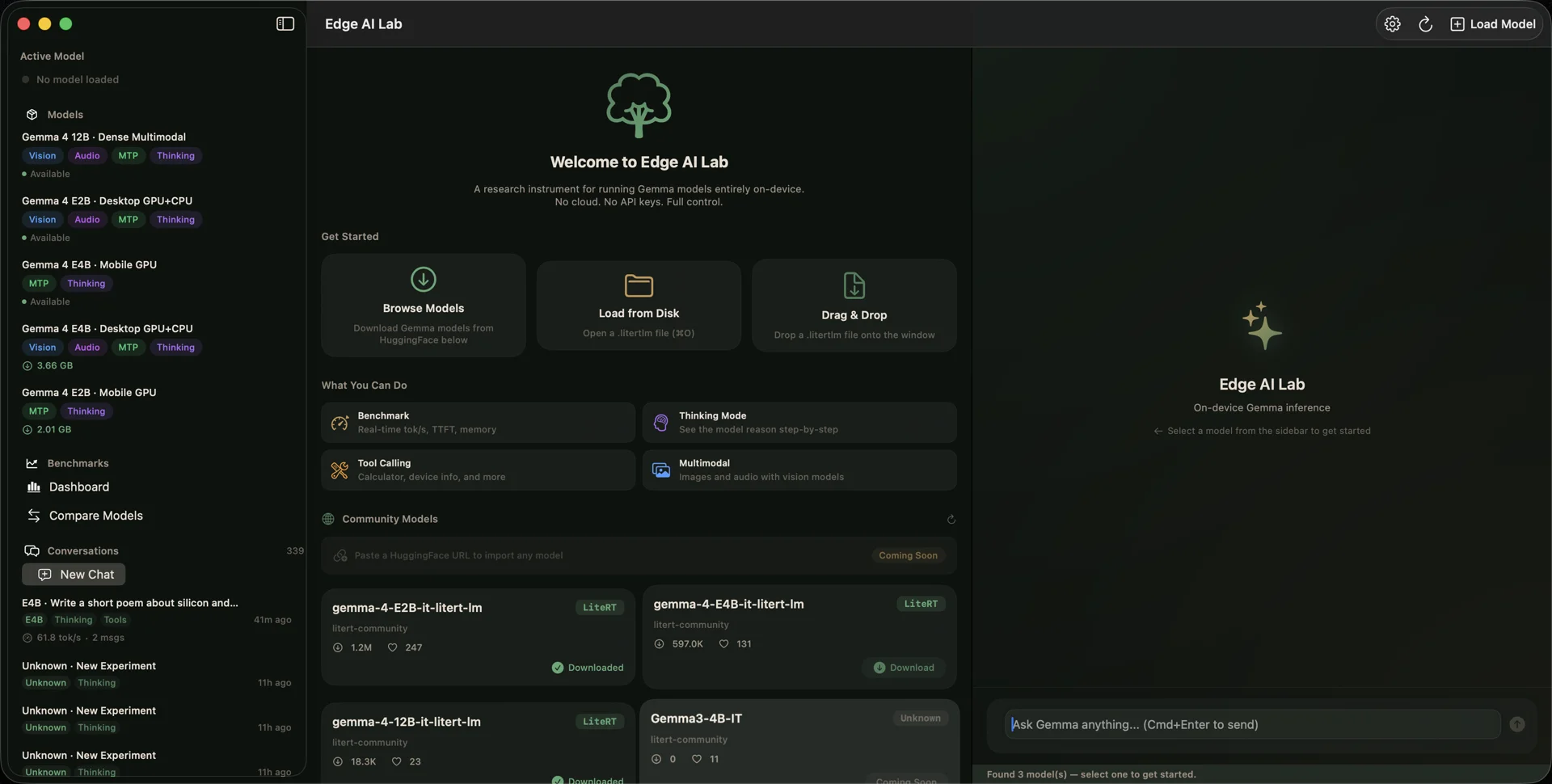
Welcome screen — three model loading paths, four capability modes, and the HuggingFace model gallery
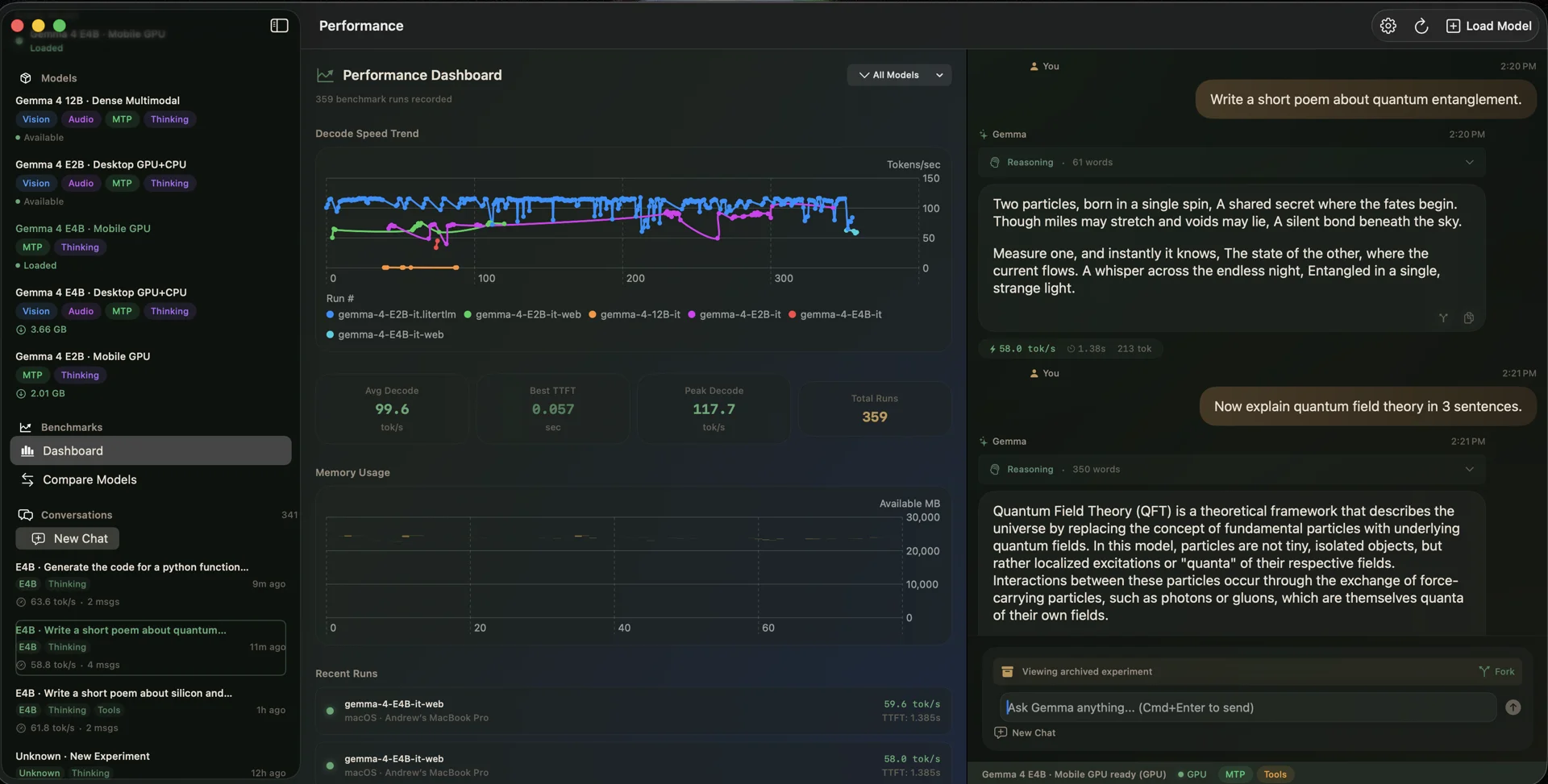
The question was simple: will Gemma 4 run on my devices, and how well? LM Studio, Ollama, and Jan answer that question with gray terminal windows and opaque settings. Edge AI Lab answers it with reproducible numbers, three inference backends, and an app that treats on-device AI as a first-class macOS and iOS citizen.
It started as a single-engine LiteRT-LM wrapper — shipped v1.0.0 on June 8 with benchmark cards, a model gallery, and 6 built-in tools the model can invoke autonomously. Then it grew: MLX brought Metal-native compute, llama.cpp opened the GGUF ecosystem, and the protocol-based engine architecture meant each backend dropped in behind InstrumentedEngineProtocol without touching the UI layer.
The build arc has its share of discoveries. Both app schemes were hardcoded to Debug, which meant MLX was running at 9 tok/s instead of 116 — a 12.8× penalty from ~400 C++ asserts compiling at -O0. The "Tools" badge was rendering in two different colors across the app and nobody noticed. The llama.cpp XCFramework needed Metal shader path fixes to compile for both macOS and iOS.
What emerged is a research-grade instrument: 4 evaluation suites (Math, Tool Calling, Reasoning, Multimodal), dynamic model registry via the HuggingFace Hub API, MCP server support, conversation persistence, and 2,000+ tests across 123 test files. Not a demo. Not a wrapper. A lab.
Latest Update
The zero-overhead inference vision: MLX vs. llama.cpp on Apple Silicon
Wed, Jul 22, 2026
Timeline
Today I shipped Edge AI Lab — a macOS app that runs Gemma 4 models entirely on-device using LiteRT-LM. No API keys, no cloud round-trips, no "demo mode." E2B Standard hits 100.7 tok/s on M4 Max with Metal, E4B Web lands at 53.5 tok/s, and the 12B Dense model runs at 0.57 tok/s (functional but honest about it — that's 12 billion parameters on a laptop GPU). The app includes a model gallery, tool calling with 6 built-in tools, thinking mode with collapsible <think> blocks, and a benchmark bar showing decode speed, TTFT, memory deltas, and thermal state. Three weeks from first commit to a real app with real screenshots replacing the AI-generated placeholders.
Added shareable benchmark cards — run a model, get a card you can post anywhere. The idea is simple: GeekBench lets you share CPU scores with a link. Why can't on-device LLM benchmarks work the same way? Each card captures decode speed, TTFT, prefill rate, P95 latency, model name, and device info in a format that's useful whether you're posting to X or dropping into a GitHub issue. Also stood up a 4-job CI pipeline with automated benchmark runs. 102 Swift source files, 123 test files. The test count is already absurd for a v1.0 and I love it.
Overhauled the download infrastructure with background URLSessions, a download queue, and a proper state machine. Models are big — the 12B Dense is 6.1 GB. You can't just fire a URLSession.shared download and pray. Background sessions survive app suspension, the queue manages concurrent downloads without thrashing bandwidth, and the state machine handles queued/downloading/paused/completed/failed transitions cleanly. Also added an AppDelegate for background download session events and iOS push notifications when downloads complete. The mobile model hub now shows queued and paused states properly — small detail, but it's the difference between "is this thing still downloading?" and knowing exactly where you stand.
Built the entire evaluation system, dynamic model catalog, and iOS parity in one push — then wrote 208 unit tests before running a single real eval. The eval system has suites, a results pipeline, and metric scoring. The dynamic model catalog replaces the hardcoded model list with something that can grow without code changes. iOS got the same catalog and conversation features the Mac had. But the part I'm proudest of: 208 tests covering eval scoring, model metadata parsing, and result serialization shipped in the same commit. Not an afterthought. Not "we'll add tests later." The test count hit 330+ before the first real model evaluation ever executed. That's the foundation that let me refactor everything that came after without flinching.
Ran a five-phase coverage push that added 500 tests in a single day, then set a 25% CI coverage floor so it never slides back. Phase 1: extract logic from SwiftUI views into testable enum namespaces. Phase 2: 10 new test files, 186 tests. Phase 3: 5 more files, 227 tests. Phase 4: logic extraction for formatters and validators, 45 more. Phase 5: update the baseline and lock the floor. macOS went from 908 to 1,407. iOS from 908 to 1,386. The real win isn't the number — it's the extraction pattern. Every SwiftUI view that had formatting logic or validation chains now has a pure-function companion with full test coverage. When I refactored ModelCapabilityProfile a month later, I changed 11 test files and nothing broke. That's what a coverage push buys you.
Added GPU memory tracking via MTLDevice.currentAllocatedSize, per-token latency histograms, thermal state monitoring, memory bandwidth estimates, and model load timing — all in one push. Nobody asked for latency histograms. The benchmarks already showed decode speed and TTFT. But "63 tok/s" hides the distribution — are all tokens fast, or do you have a long tail of 200ms spikes from thermal throttling? Now you can see the P95. Thermal state tracking means the benchmark card tells you whether the machine was cool or cooking when the numbers were recorded. GPU memory via Metal's allocated size API shows exactly how much VRAM the model actually consumes, not what the spec sheet claims. Also built a Canvas side panel with WKWebView for HTML artifact rendering. The instrumentation is the part that makes Edge AI Lab a research tool instead of a chatbot wrapper.
Built the MLX engine from scratch in two days: foundation, ViewModel migration, VLM image pipeline, multi-file downloads with SHA-256 integrity, and runtime engine switching UI. Day one was the protocol work — InferenceEngine replaced the LiteRT-LM-specific interfaces, and 24 test files migrated to MockInferenceEngine. Day two was the real engine: sampling parameters, native tool calling, streamDetails metrics, and the VLM pipeline that lets Gemma 4 see images through Metal-native compute. The multi-file download system handles MLX's split-weight format (5-10 files per model) with SHA-256 verification per shard. The engine switching dropdown in the toolbar lets you swap backends without restarting. 47 tests for format detection, engine switching, and RuntimeType. The "three engines, one app" log entry from July 6 gets the glory, but this is where the protocol architecture proved it works.
Edge AI Lab now runs three inference backends: LiteRT-LM, MLX, and GGUF (via llama.cpp). Each engine has an adapter behind InstrumentedEngineProtocol, so the rest of the app — conversation UI, benchmarks, eval runner, tool calling — doesn't care which backend is active. LiteRT-LM is the original. MLX brings Apple's ML framework with Metal-native compute. GGUF opens up the llama.cpp ecosystem with quantized models. Same model, three ways to run it, all on-device. The protocol-based DI means the entire test suite works against mock engines too — no real model needed for CI.
Spent a session studying Apple's Liquid Glass design language and asking a pointed question: why build this at all if it looks like every other local inference app? LM Studio, Ollama, Jan — they all have the same aesthetic: dark sidebar, chat window, settings panel. Functional but forgettable. The idea behind Edge AI Lab's visual identity was different: make local LLMs feel like native, premium system features. Not a developer tool wearing a tuxedo — an actual macOS citizen with a curated "Dark Forest" color palette, per-capability SF Symbol iconography, and transitions that respect the OS conventions. The design system isn't decoration. It's the argument that on-device AI deserves better than a terminal in a window.
Got llama.cpp compiling into a universal XCFramework that supports both macOS and iOS — and the journey there was not straightforward. The sticking point was Metal shader compilation: the paths differ between iOS and macOS targets, and the build system was silently picking the wrong one for cross-compilation. This was the milestone that answered the fundamental question: will this run on-device across both platforms? Yes. Yes it will. With the GGUF engine wrapped behind InstrumentedEngineProtocol, the rest of the app doesn't know or care that there's a C++ inference runtime underneath — it's just another engine adapter that speaks Swift.
Ran a full design system audit and found the "Tools" badge was rendering in two completely different colors across the app — amber in 14 places, teal in 5. The initial suspicion was a status color split between cyan and green dots, but a deep dive revealed those were actually the exact same RGB value. The real problem was the badge inconsistency — toolCall (amber) and badgeTools (teal) both meant "tools" but looked nothing alike. Fixed it by restructuring the sidebar into three parallel sections (Models / Tools / Experiments), moving "New Experiment" to the section header, and replacing heavy pill badges with plain text and per-capability colored SF Symbol icons. Filled vs. open circles now indicate active vs. available model states. Small visual cleanup, massive consistency improvement.
Built the tool calling infrastructure — 6 built-in tools that Gemma can invoke autonomously during conversation. Calculator, date/time, device info, unit converter, text analyzer, system health — all running entirely on-device with zero network access. The model decides when to call them based on conversation context. But the bigger moment was the vision: what if we could let the models interact with the OS while running locally? This session also laid the groundwork for MCP server support, letting external tools connect via stdio JSON-RPC. Agent mode with fuzzy termination, retry logic, and structured error classification came later, but this was the session where the on-device model stopped being a chatbot and started being an instrument.
Added @Environment(\.accessibilityReduceMotion) to 4 perpetual animations so the app respects the user's preference. Any animation that loops indefinitely — loading spinners, pulsing indicators — now falls back to static visuals when Reduce Motion is enabled. While in there, found 10 occurrences of 3 duplicated transition patterns scattered across the codebase with no semantic naming. Consolidated them into AppTransition tokens. Created AppAnimation.micro for inline animations. Fixed typography violations. This is the kind of work that doesn't ship a feature but makes every feature better — and it's the kind of thing you have to actively choose to do, because nobody asks for it.
MLX inference was crawling at 1.8–9.1 tok/s. The fix was one word in Project.swift: .release. Both app schemes were hardcoded to .debug, which meant SPM packages — including mlx-swift — compiled at -O0 with ~400 C++ assert() calls in hot paths. GGUF and LiteRT-LM were completely unaffected because they use precompiled C/C++ frameworks that ignore the scheme's optimization level. Created a new "Edge AI Lab (Release)" scheme, rebuilt, and MLX jumped to 116.2 tok/s. That's a 12.8× improvement from changing a build configuration. The initial 116 tok/s reading looked like an outlier — steady-state settled at 56–63 tok/s, which is still the fastest engine in the app. Three hours of profiling to find a one-line root cause. Classic.
Researched the HuggingFace Hub API and realized we'd been overcomplicating model discovery. The original approach was parsing model card HTML and guessing file structures. Turns out the API gives you everything: GGUF shapes, file sizes, quantization info, and sibling file listings. Combined with the new ModelCapabilityProfile architecture, the app can now dynamically build its model registry from Hub API responses instead of maintaining a hardcoded catalog. This is what makes the "Paste & Go" URL import work — paste a HuggingFace URL, the app infers capabilities from the API response, downloads, and you're running inference. No manual configuration.
Bootstrapped the evaluation framework — 4 built-in suites (Math, Tool Calling, Reasoning, Multimodal), custom suite editor, batch "Run All" mode with time estimation. This was the session where the ModelCapabilityProfile migration paid off. The old ModelMetadata was a flat struct that knew models by name. The new system knows what models can do — which suites they can run, whether they support vision input, what their context limits are. The eval runner uses this to skip incompatible suites automatically instead of crashing on large prompts. Now we can benchmark exactly how these models degrade at high quantization levels, right on the metal. Not synthetic cloud benchmarks — real hardware, real thermal throttling, real numbers.
Migrated the entire model system from ModelMetadata/ModelRegistry to ModelCapabilityProfile/KnownModelCatalog. The old system was a flat registry that knew about models by name. The new system describes what models can do — which backends they support, whether they handle vision or audio, their memory requirements, context window sizes. 11 test files migrated, every reference to the old types replaced. The test count crossed 2,000 during this push. That number isn't a vanity metric — it's what lets me refactor core types without holding my breath. Shipped alongside a llama.cpp bump (b9929 → b10076) and mlx-swift-lm dependency advance. The model layer is now ready for whatever Gemma ships next.
Spent 8 PM to 6 AM fixing the CI pipeline — twelve consecutive commits before it finally went green. It started with the xcode-27 runner migration. The macos-26 runners didn't have the Xcode 27 toolchain, so builds failed silently. Switched to xcode-27 runners — now Metal Toolchain wasn't installed. Added it — now test targets compiled for macOS 27 but the CI runner was macOS 26. Lowered deployment targets to 26.0 — Keychain tests failed because CI has no keychain. Marked them .enabled(if:). MLX tests crashed because the @Suite init hit a circular reference. Moved the precondition to module level. Swift Testing setUp() throws wasn't a thing — switched to setUpWithError(). Every | tail pipe was swallowing exit codes and hiding failures. Removed them all. Twelve commits. Zero human interventions. The pipeline finally went green at 5 AM. Nobody writes blog posts about CI — but every refactor after this one shipped with confidence because the pipeline catches regressions in 8 minutes.
Explored whether we could bypass llama.cpp entirely and compile straight via mlx-swift for zero-overhead Metal inference. The CudaBuild plugin validation failure in mlx-swift 0.31.6 was the trigger — if the MLX dependency is fragile, is it worth the complexity? The answer turned out to be nuanced: MLX is the fastest engine when compiled in Release (after the debug scheme discovery), but llama.cpp is the most portable and has the widest model format support. Both stay. The vision isn't picking a winner — it's giving the user three backends and letting the benchmark numbers speak for themselves. That's the whole point of Edge AI Lab: not opinions about which runtime is best, but reproducible data on your actual hardware.